This post is an AI translation of the Chinese original. If there are any discrepancies, the Chinese version takes precedence.
We recently got a new technical request from a client: they wanted help with semantic modeling and data governance for a data lake of historical vehicle signals, so that data could later work together with AI agents.
After I took the request, I did a quick round of research. In theory, it comes down to one question: how do you actually put ontology to work in real engineering? Looking back, I’d say most past projects had done something similar in places, but never as a complete system.
So I built a small demo to teach myself the whole picture of ontology in engineering. This post records what I learned, and how the demo ties theory to practice.
What an ontology covers in practice
In practice, an ontology usually has four parts: concepts, mappings, relationships, and rules.
In short:
- Concepts: what the business objects are, what they mean, their units, and the names people actually use.
- Mappings: where each concept lives in physical storage.
- Relationships: how concepts own or connect to each other, which decides whether a query needs to join tables.
- Rules: business decision logic, such as thresholds and durations.
Put another way: the database stores numbers, while the ontology stores what those numbers mean, where they are, and how to use them.
When I collected concepts, I started from real business questions and common terms, grouped synonyms under the same concept, and split entities from measurements. Entities like Vehicle and Battery stand for business objects; measurements like battery temperature and vehicle speed stand for observable values, each with a unit and aliases so different phrasings can match.
For mappings, I first listed the physical tables and columns, then mapped each concept to one table.column in a single central place. Each concept points to exactly one location, queries read from the mapping, and no table names are hard-coded across the code. Fields with the same meaning from different sources need their definitions aligned before they’re written into the mapping.
For relationships, I recorded ownership and links. Ownership says who a concept belongs to; links say which concepts need to be queried together. Two concepts with a link need a JOIN, while unrelated ones can be queried on their own.
For rules, I wrote business checks as runnable definitions: which concept they refer to, how to compare, threshold, unit, and duration. Thresholds live in rules rather than in code, so a definition change only means editing the rules.
Demo background: three layers and four pages
The demo simulates vehicle signal data: 3 vehicles, 5 tables, covering basic vehicle info, battery readings, vehicle readings, and brake readings, with time indexes.
The data follows business logic: 2–3 trip windows per day, speed near 0 when parked, battery drains while driving and charges back overnight, temperature mostly swings between 30 and 45 degrees with speed, with occasional sustained heat above 50 degrees, and brake pressure mostly 0 to 100 bar with occasional hard braking above 150 bar.
The system has three layers: a semantic layer on top, SQLite at the bottom, and an agent in the middle. A request first checks the semantics, then builds SQL, then hits the database.
flowchart TD
    U[User question] --> A[Agent]
    A --> S[Semantic layer]
    S --> Q[Query Plan]
    Q --> SQL[SQL]
    SQL --> DB[(SQLite)]
    DB --> R[Rows found]
    R --> A
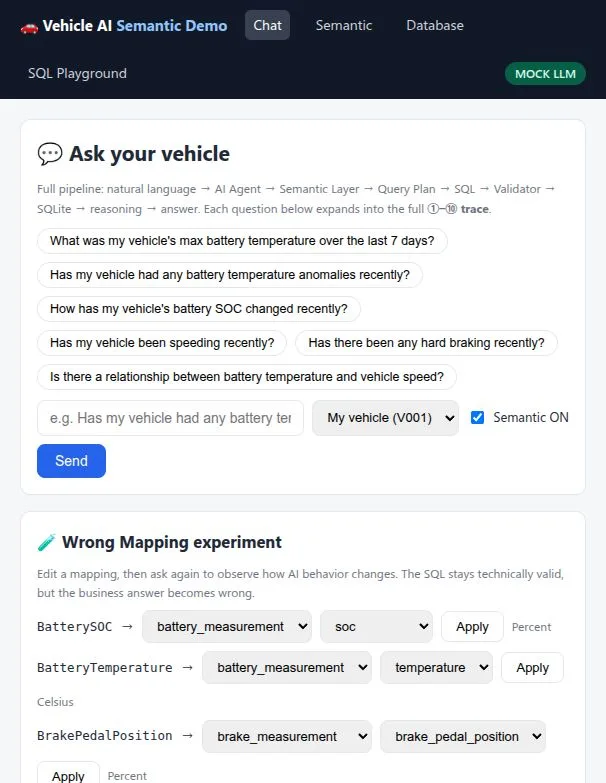
There are four pages: chat, semantic browser, database browser, and a SQL playground. Questions go in the chat page; mappings are viewed and edited on the semantic page.
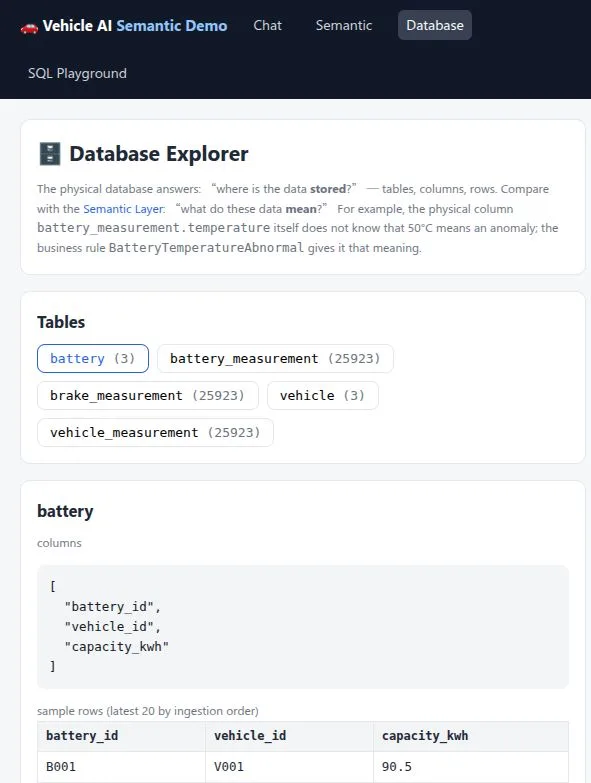
The database page is for spot-checking physical tables. Taking the battery table as an example, you can see its columns and sample rows:
Core design: how four JSON files split the work
The demo’s stack is simple: Go on the backend (plain net/http for serving), SQLite for storage (the pure-Go modernc.org/sqlite driver, no CGO), local JSON files for the semantic layer, and plain HTML + CSS + Vanilla JS on the front end. The agent has two modes: MOCK by default (no API key needed, fixed rule-based flow), plus an OpenAI-compatible real LLM option.
The layout looks like this:
sementic-ai/
├── main.go                  # wiring: .env → SQLite+seed → catalog → agent → :8080
├── agent/                   # AI agent: intent detection, QueryPlan, SQL build, result reasoning
├── semantic/                # semantic layer in Go: catalog + search
├── semantic_data/           # semantic data: 4 JSON files
├── database/                # physical layer: SQLite schema, seed, read-only queries
├── tools/                   # two tools the agent can call: search semantics, run SQL
├── validator/               # SQL checks: read-only, single statement, table allowlist
├── server/                  # net/http service: pages + JSON APIs
└── web/                     # front end: HTML + CSS + Vanilla JS
The modeling work lives in four JSON files under semantic_data/. On the Go side, SemanticCatalog offers methods like Search / GetMapping / GetRule for the agent to call at runtime.
concepts.json holds 7 concepts. Vehicle and Battery are entities, while BatteryTemperature, BatterySOC, VehicleSpeed, BrakePressure, and BrakePedalPosition are measurements:
"BatteryTemperature": {
  "description": "Temperature measurement of the vehicle battery",
  "type": "measurement",
  "unit": "Celsius",
  "keywords": ["battery temperature", "temperature", "thermal", "overheat"]
}
Each concept carries its unit and common names (including Chinese aliases) for semantic search. For example, a question about braking can match BrakePressure and BrakePedalPosition.
mappings.json records where each concept lives:
"BatteryTemperature": { "table": "battery_measurement", "column": "temperature" },
"VehicleSpeed": { "table": "vehicle_measurement", "column": "speed" }
The mapping lives only here. The SQL-building code in agent/ and tools/ doesn’t hard-code table names — it has to call GetMapping() at runtime to find the query target.
relationships.json describes how concepts connect:
"BatteryTemperature": {
  "belongs_to": ["Battery", "Vehicle"],
  "related_to": ["VehicleSpeed"]
}
has / belongs_to / related_to decides whether a multi-concept query needs a JOIN. For instance, a joint analysis of temperature and speed works because the two share a related_to link.
business_rules.json holds 3 business rules:
"BatteryTemperatureAbnormal": {
  "concept": "BatteryTemperature",
  "operator": ">", "threshold": 50,
  "minimum_duration_minutes": 5
}
The other two cover speeding over 120 and hard braking over 150. These thresholds don’t exist in the database — the temperature column itself says nothing about whether 50 degrees counts as abnormal. Since thresholds sit in JSON instead of code, changing a definition only means editing the data files.
The four files link up like this: concepts are the base, mappings bind concepts to table.column, relationships set how multi-concept queries join, and rules point at concepts to give decision logic. The agent follows the same chain at runtime: Search finds the concept, GetMapping / GetRule fetch the location and threshold, then it builds the QueryPlan and SQL.
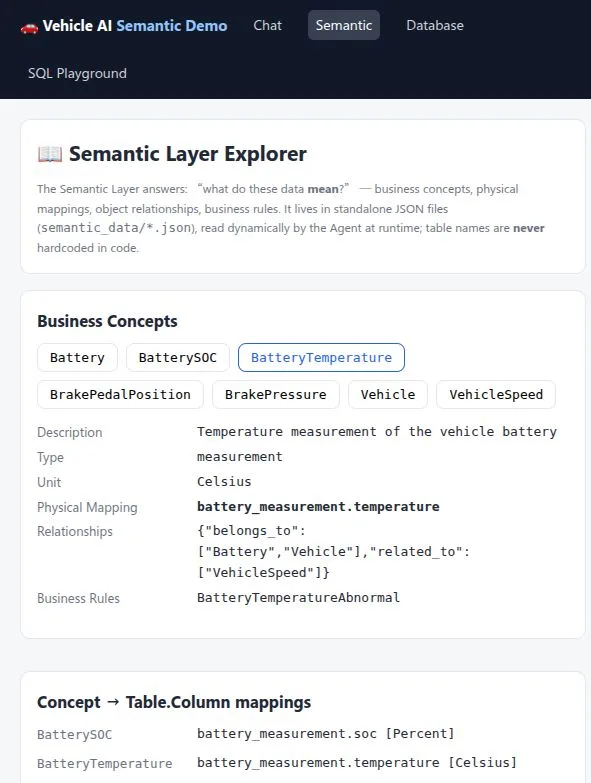
The semantic page shows all of this in one place. Taking BatteryTemperature as an example, you can see its description, unit, physical mapping, relationships, and rules:
JSON is just one way to carry the modeling work, and it fits an early stage with a small scope and frequent changes. The same content could live in RDF/OWL with triple stores, a property graph database (like Neo4j), relational tables, a config center or semantic platform, or code annotations. The storage differs, but the four parts — concepts, mappings, relationships, rules — stay the same. What changes is mostly querying, version control, and scale.
How one full Q&A round runs
Take the question “Has my car had any battery temperature issues lately?” as an example. The trace on the page breaks down into these steps.
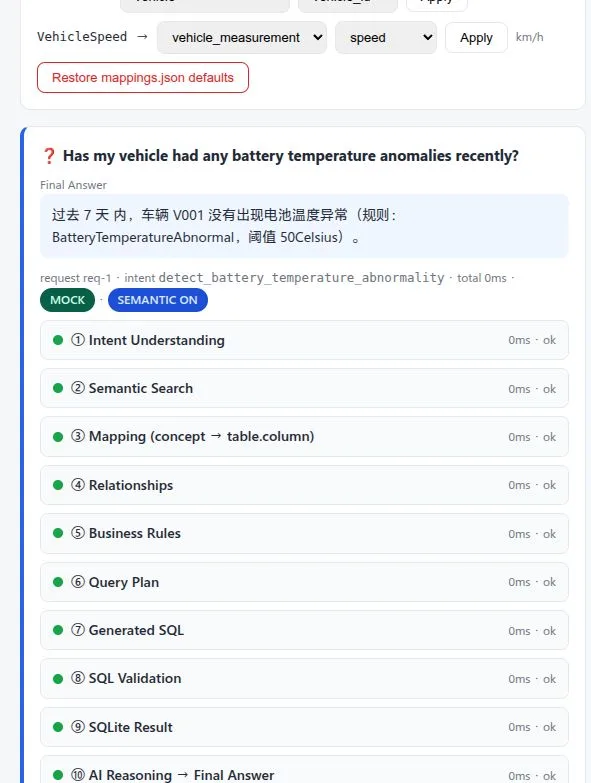
First it detects the intent: a battery-temperature anomaly query, default vehicle V001, last 7 days. Then it searches the semantic catalog with battery temperature abnormal and hits Battery and BatteryTemperature. Next it fetches the mapping by concept name, pinning the query to battery_measurement.temperature, and fetches the rule: over 50 degrees for 5 minutes.
With that in hand, it builds the QueryPlan, then the SQL:
SELECT timestamp, temperature AS value FROM battery_measurement
WHERE vehicle_id = 'V001'
AND timestamp >= datetime('now','-7 days')
AND temperature > 50
ORDER BY timestamp
Then it validates and queries the database. This run found no group that stayed over the threshold long enough, so it returned a no-issue answer in Chinese.
flowchart LR
    Q[Question: battery issues lately?] --> I[Detect intent]
    I --> S[Search semantic catalog]
    S --> P[Build Query Plan]
    P --> G[Build SQL]
    G --> V[Validate]
    V --> D[(Query SQLite)]
    D --> R[Group by rule, answer]
The ontology kicks in at two points: before SQL is built, where both the query target and the threshold come from the semantic catalog instead of hard code; and after rows come back, where the grouping of anomaly events again follows the rule definitions.
Here’s the real trace for that question, with steps 1–10 all passing:
What changes with and without the semantic layer
The chat page has a semantic switch (Semantic ON/OFF), on by default. When you ask a question, it’s sent to /api/chat as semantic_enabled and controls whether the agent goes through the semantic catalog: when on, it checks the catalog before building SQL; when off, it skips the semantic steps and builds SQL directly. The switch exists to compare behavior with and without the semantic layer, and the semantic page also offers mapping edit and reset APIs for a broken-mapping test.
When it’s on, the flow checks the semantic catalog first, then builds SQL. Both the query target and the threshold come from mappings and rules.
When it’s off, the semantic search, mapping fetch, relationship fetch, and rule fetch steps are all skipped, and the model guesses SQL straight from table and column names. For example, it might produce SELECT temperature FROM battery ..., which fails with no such column: temperature — the real table is battery_measurement. Without the semantic layer, there’s also no way to pin down what business words mean (how hot counts as abnormal, how long counts as sustained).
There’s also a broken-mapping test: change BatteryTemperature’s mapping from temperature to voltage, then ask for the highest battery temperature. The QueryPlan shows MAX(voltage), the SQL is valid, all checks pass, and the database duly returns 411.0 — so the final answer reads 411.0°C. Nothing in the chain reports an error, yet the business answer is clearly off.
The two comparisons show the same lesson: a correct SQL only means valid syntax, existing tables and columns, and read-only access. A correct business answer also depends on finding the right concept and using the right threshold. The validator covers the former; the semantic layer covers the latter.
This post stays at the surface level — what an ontology is made of and how it runs. It doesn’t cover harder engineering topics like version control, conflicting definitions, or large-scale reasoning. Treat it as a starting point.